Pass Inspections: Offline Construction Training Records for Crews

The fastest, audit-ready way to manage construction training records is a centralized system that captures who was trained, on what, by whom, when it expires, and proof it actually happened. A tool like a digital certification platform can handle that digitally, while sites still relying on paper should follow apprenticeship logbook conventions. Either way, expiry alerts and audit-ready exports aren’t optional extras. They’re the difference between passing an inspection and scrambling for documents that may not exist.
TL;DR:
- Maintaining a digital, audit-ready training record system with expiry alerts and proof of completion is essential for passing inspections and avoiding document gaps.
- Proper records must include employee details, course specifics, completion dates, and verified evidence, meeting regulatory and project-specific standards.
- Storage options should match crew size and connectivity, with cloud, local, or hybrid systems preferred over paper logs for larger or remote sites.
- Continuous record management, clear ownership, and regular mock audits help ensure compliance and quick retrieval during inspections.
- Building a functional training matrix with clear status indicators and automated scheduling improves site safety and reduces oversight errors.
Table of Contents
- What Belongs in Every Construction Training Record
- Where Should You Store Training Records?
- How Do You Keep Training Records Audit-Ready?
- How Do You Build a Training Matrix That Actually Works?
- Choosing a Record-Keeping System That Fits Your Site
- What’s the Process for Correcting a Training Record?
- Author Perspective: Field-Proven Pitfalls and Quick Wins
- How CertiCerts Fits Into a Compliance Workflow
- Where to Go for Authoritative Guidance
- Sources
What Belongs in Every Construction Training Record
Auditors and project owners look for the same things every time, regardless of trade or province. Miss one of these fields and a record that looks fine on the surface can fall apart the moment someone asks for evidence.
A defensible construction training record needs:
- Employee identification and role — full name, job title, and site or crew assignment
- Course details — title, provider or trainer name, and the specific standard or regulation referenced
- Dates and outcome — completion date, expiry date, training duration, and assessment result (pass/fail or competency achieved)
- Evidence of completion — a signed certificate, a scanned logbook entry, or a QR-verified digital credential
- Record metadata — issuing authority, a unique record ID, a timestamp, and a retention note stating how long the file must be kept
OSHA’s construction training standard requires employers to keep records showing the employee’s name, the trainer’s name, and training dates, available for inspection for as long as the standard specifies. That’s the regulatory floor. A good training log template usually adds a notes column for context, since a bare date with no detail rarely survives a follow-up question from an inspector.
Where Should You Store Training Records?
Storage choice depends less on preference and more on crew size, site connectivity, and how fast you need to prove compliance when someone asks.
Paper logbooks still work for apprenticeship programs, where the format is often mandatory. The Construction Craft Worker 450A apprenticeship logbook requires sponsors and trainers to sign off on specific competencies before hours count toward the total training hours some trades require. If your program mandates a logbook, keep it as the authoritative source and don’t try to replace it with a spreadsheet.
For everyone else, the storage models break down like this:
- Spreadsheets — cheap and fast to start, but error-prone once you pass a few dozen employees; enforce dropdown validation and a single owner who enters data
- Local desktop apps — full control over data, works without internet, and verification happens instantly at the gate; ideal for remote or low-connectivity sites
- Cloud platforms — real-time access across multiple job sites and automatic updates, at the cost of depending on a stable connection
- Hybrid setups — local-first control with optional cloud sync, giving you offline reliability without losing multi-site visibility
Regional safety associations have already built versions of this. Construction Safety Nova Scotia’s Safety Net gives employers real-time access to training records in one place, and the Construction Safety Association of Manitoba runs a similar online database for member companies. Past a certain scale, manual spreadsheet tracking stops being a time saver and starts being a liability.
How Do You Keep Training Records Audit-Ready?
Audit-readiness isn’t a one-time cleanup. It’s a process you run continuously, and it fails the moment ownership becomes unclear.
- Set a retention policy first. Decide how long each record type stays active versus archived, and version every update so old entries aren’t silently overwritten.
- Automate expiry notifications. Certifications lapse quietly. A system that flags an expiring card 30 or 60 days out beats discovering the gap during a site inspection.
- Standardize your evidence format. Pick one proof type, whether that’s a signed PDF certificate or a QR-verifiable digital credential, and require it for every course, every time.
- Generate exportable, timestamped reports. CSV or PDF exports that can’t be edited after the fact give auditors something they can trust on sight.
- Assign clear ownership. Someone creates the record, someone approves it, and someone archives it. Three different people, three distinct responsibilities.
Pro Tip: Run a mock audit every quarter. Pull five random employee files and see if you can produce complete evidence in under ten minutes. If you can’t, your system has a gap worth fixing before a real inspector finds it.
Off-site or cloud backups matter here too. A structured backup process protects against the single point of failure that sinks most paper-based systems: a lost binder, a corrupted hard drive, a laptop that walks off a job site.
How Do You Build a Training Matrix That Actually Works?
A training matrix turns scattered certificates into one visual that tells you, at a glance, who’s qualified and who isn’t.
The essential columns are simple: employee name, role, required certifications for that role, expiry date, and current status. Status should follow a clear rule set, not a gut feeling. Fall protection and confined space entry are critical certifications that block someone from a task the moment they lapse. Optional professional development courses don’t carry the same urgency.
A few things separate a matrix that gets used from one that gets ignored:
- Traffic-light formatting — green for current, yellow for expiring within 30 days, red for lapsed, scannable in seconds
- Daily or weekly supervisor reports — pulled automatically so site leads know who’s cleared for induction that morning
- Automated recertification scheduling — grouping employees whose certifications expire in the same window for a single group session
- Bulk issuing for training events — importing an attendee list once and generating certificates for the whole group instead of one at a time
Done right, the matrix becomes the single document a site supervisor checks before letting anyone onto a restricted task.
Choosing a Record-Keeping System That Fits Your Site
Most record-keeping failures trace back to picking a system that doesn’t match how the crew actually works, not to a lack of effort.
Start with data ownership and connectivity. A cloud platform makes sense for an office-based HR team managing multiple sites with reliable internet. A local-first desktop application makes more sense for remote sites where connectivity drops and you’d rather own your data outright than depend on a server you don’t control.
Beyond that, weigh these factors:
- Verification method — QR codes and digital signatures let a site supervisor confirm a certificate is real in seconds, without a phone call
- Reporting depth — can it generate the timestamped exports an auditor will actually accept
- Bulk workflows — does it handle a 40 person training day without manual entry for each attendee
- Cost structure — expect either a one-time license, pay-as-you-go credits for occasional issuers, or a subscription for ongoing high-volume use
Pro Tip: If your crew works across two or three sites with spotty cell coverage, test any system’s offline verification before you commit. A QR code that only validates online is useless the moment the site loses signal.
What’s the Process for Correcting a Training Record?
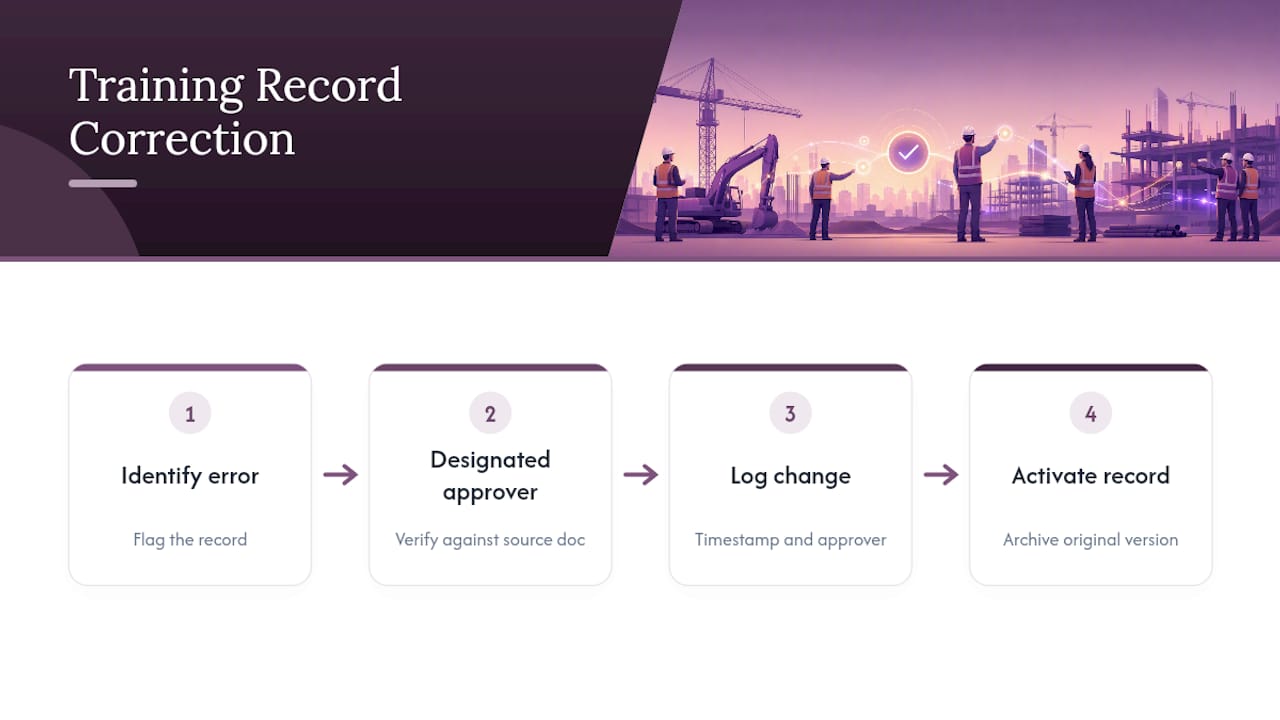
Mistakes happen, someone enters the wrong expiry date, a name gets misspelled, a certificate gets attached to the wrong employee, and how you fix it matters as much as catching it.
Never simply delete or overwrite the original entry. Corrections should create a new, dated version while preserving the original record in an archived state. That version history is what protects you if an auditor asks why a record changed. A silent edit with no trail looks worse than the original mistake.
The correction process should follow a fixed sequence: someone identifies the error, a designated approver (usually the safety manager or HR lead, not the person who made the original entry) verifies the correct information against the source document, the system logs the change with a timestamp and the approver’s name, and the corrected record replaces the active version while the old one moves to an archive folder rather than the trash.
Set a turnaround expectation too. A correction flagged on a Monday shouldn’t still be pending two weeks later, especially if the record affects whether someone can legally perform a task that week. Build in a review cadence, monthly works for most crews, where someone spot checks recent corrections to make sure the approval step is actually happening and not just rubber stamped. Skipping that review is how a “temporary” workaround becomes the actual process nobody remembers approving.
Author Perspective: Field-Proven Pitfalls and Quick Wins
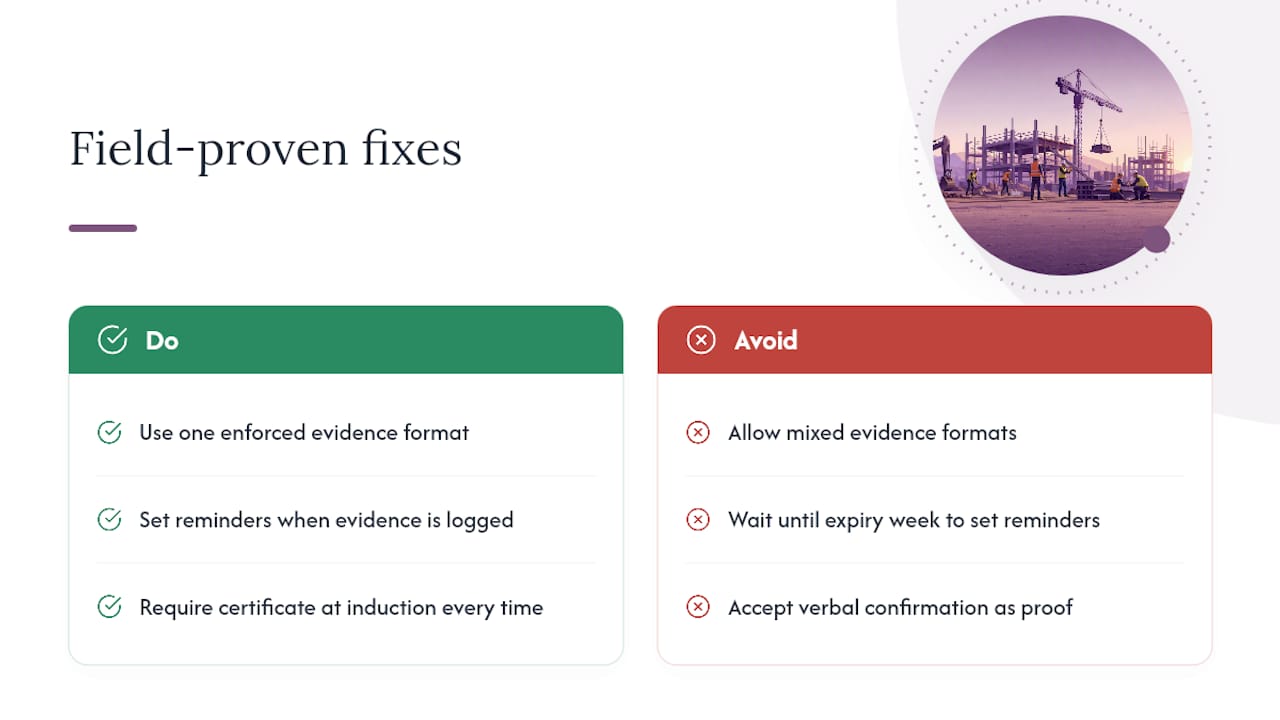
The failures I keep seeing aren’t complicated. Incomplete evidence, no expiry tracking, and files scattered across three different laptops and someone’s email inbox. None of that requires a sophisticated fix.
Pick one evidence format and enforce it without exception. Set calendar reminders for every expiry date the week it’s logged, not the week it lapses. Require certificate proof at induction, every time, no verbal confirmations. These three habits catch most of the gaps before they become a problem during an inspection.
— James
How CertiCerts Fits Into a Compliance Workflow
A practical alternative to juggling spreadsheets, paper binders, and a filing cabinet full of certificates that may or may not still be valid is a dedicated certification management system. Such systems may offer local-first desktop control so your data stays on your machine even on a job site with no signal, QR verification to let a supervisor confirm a credential in seconds at the gate, and batch issuing to handle a 50-person training day without manual entry for each attendee.

Compliance dashboards and training matrix visualizations often map onto expiry tracking and status rules, and audit-ready exports mean a timestamped report is a few clicks away instead of a weekend project. If your crews work across sites with unreliable internet, or you’d rather own your training data outright than rent access to it, a local-first tool solves a real problem cloud platforms don’t. Start with a free trial to issue your first certificates and see how the matrix and QR verification work on an actual site before deciding whether to move past the trial’s limits.
Where to Go for Authoritative Guidance
- OSHA’s training standard sets the regulatory baseline for what records must contain and how long to keep them.
- The apprenticeship logbook shows how formal sign-off procedures work for on-the-job training hours.
- Construction Safety Nova Scotia’s Safety Net and the Manitoba training database demonstrate association-run verification systems.
- For readers organizing documentation with outside help, construction compliance consulting is worth a look, and workers building their credentials into a resume can reference this construction resume guide.
Sources
- Construction Craft Worker 450A Apprenticeship logbook (Skilled Trades Ontario)
- Training Records (Construction Safety Association of Manitoba)
- Safety Net (Construction Safety Nova Scotia)
- 1926.1207 - Training. | Occupational Safety and Health Administration